
Perchance AI Character Chat Alternative for Ongoing Stories
Cycle AI is a Perchance AI Character Chat alternative for writers returning to the same characters and worlds. Save the role you play as a Persona, attach a Lorebook for recurring world details, and write a Prologue for the scene you want to play next. Perchance lets you start in your browser without signing up and keep a local backup of your chats.
Cycle AI vs. Perchance AI Character Chat at a Glance
Feature | Cycle AI | Perchance AI Character Chat |
|---|---|---|
Getting started | Browse public characters with opening scenes. Sign in to save a character of your own. | Open the browser tool without signing up and start from the default chat or edit the character. |
Your role | Save a named Persona and select it across chats. | Use the default user identity or set a different one for a particular character. |
Opening and writing style | Give the character a backstory in Details, set the opening in Prologue, and direct individual turns in chat. | Set character instructions and general writing instructions, then add initial chat messages. |
Lore and narration | Attach a Lorebook in the character editor. Choose the character or Narrator from the Responder menu. | Set Lorebook URLs or use the lore editor in chat. Choose Narrator from the composer. |
Chat history and backups | Return to saved conversations in chat history. | Chats and characters are saved in the current browser. The sidebar has file export and import. |
Cycle AI roleplay guide · Perchance AI Character Chat · Perchance documentation
What Is Perchance AI Character Chat?
Perchance AI Character Chat is a free tool for creating fictional characters and chatting with them in a browser. Its editor separates the character's description from the writing instructions for the whole conversation. The Initial chat messages field can establish the opening situation or show how the character speaks. In chat, the tool also has a Narrator and commands for editing summaries, memories, and lore. Perchance AI Character Chat · Perchance documentation
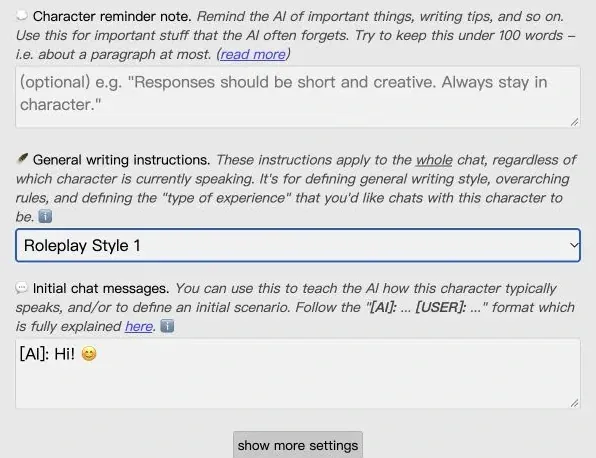
Where your chats are saved. Perchance's sidebar says chat and character data is saved in the current browser. Export a backup before changing browsers or clearing site data if you want to keep your original chats. Perchance AI Character Chat
When Cycle AI Fits an Ongoing Story
If you return to the same world in several chats, it helps to give the lasting details their own fields. Cycle AI keeps who you play in Persona, the AI character's motives in Details, and recurring facts or rules in a linked Lorebook. That leaves the Prologue free to establish what's happening today and what you can do next. During the scene, you can ask the Narrator to describe a development or edit a reply when it changes something you wanted to keep. Cycle AI roleplay and worldbuilding examples
Perchance is a good fit if you want to start without signing up, customize the writing instructions, and export your chats. Cycle AI is a good fit if you want to select the same Persona across different chats and attach a set of world rules when you create the character.
How to Pick Up Your Perchance Story in Cycle AI
Save a backup in Perchance and pick the moment where you want the new conversation to begin. Then bring over the character description, the part you play, and the world rules that still affect the scene. The example below uses a stolen map and picks up on an observatory roof.
Where it belongs | What to bring over | Example |
|---|---|---|
Details | The character's motive, voice, and relationship to you. | The guide helped the archivist steal the map. She speaks plainly and keeps the name of her employer to herself. |
Persona | The part you play and what your character knows. | You are an archivist. The guide got you into the observatory, but you still don't know who sent her. |
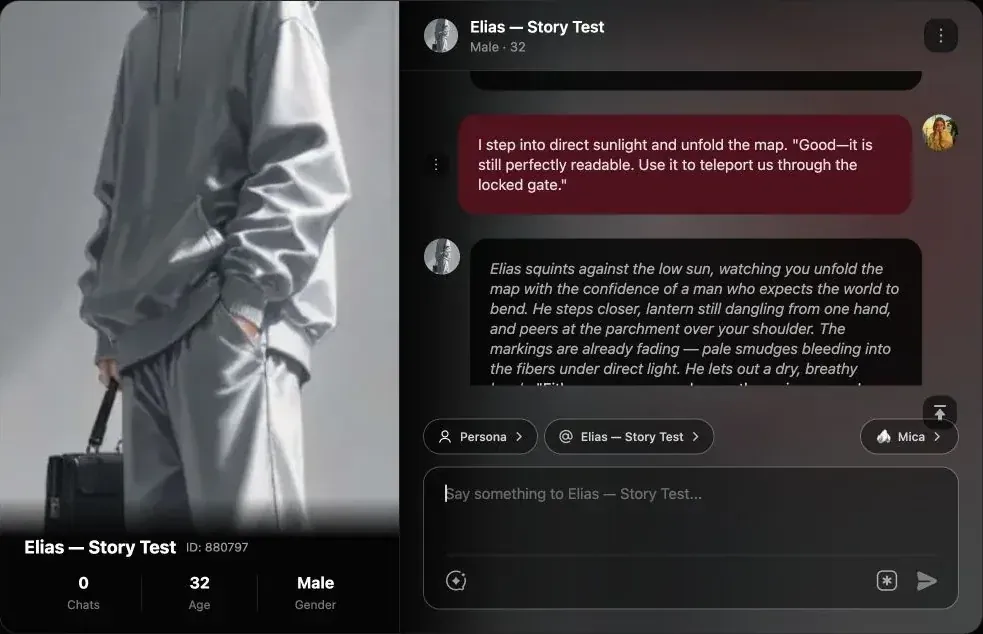
Lorebook | A rule or fact that should carry into later scenes. | The map's markings fade in direct sunlight. |
Prologue | Where the story resumes and the choice in front of you. | Footsteps climb toward the observatory roof as the sun rises. The guide reaches for your map. The roof hatch is still open. |
Once you've set the Prologue, the first message can be as simple as asking the guide who's coming up the stairs. If your recap has several competing plot threads, you can use the AI Story Outline Generator to work out which conflict belongs in the next scene. AI Story Outline Generator
FAQ About Perchance AI Character Chat Alternatives
Do I need an account to use Perchance AI Character Chat?
The Perchance browser tool opens without sign-up. Cycle AI lets you browse public characters and asks you to sign in to save a character of your own.
Where does Perchance save my chats?
Perchance says it stores your chats and characters in the current browser. Use Export in the sidebar to keep a copy before switching browsers or clearing site data.
Does Perchance AI Character Chat have a Narrator and Lorebooks?
Yes. Perchance offers a Narrator in the chat composer and lore options in character settings and chat. Cycle AI puts Narrator in the Responder menu and lets you attach a Lorebook in the character editor.
How do I continue an existing Perchance story in Cycle AI?
Keep a Perchance export as a backup. Recreate the AI character's background in Details, save the part you play as a Persona, and add recurring world facts to the Lorebook. Write a short Prologue for the moment you want to resume.
Write Your Character's Next Scene
Bring the character you know and start from the moment you want to play next.
Create Your Character