
PolyBuzz Alternative for AI Roleplay: Cycle AI vs. PolyBuzz
Cycle AI is a PolyBuzz alternative for people who want to direct the next turn of a story. Choose the role you play, decide whether the character or Narrator responds, and edit a reply before the story moves on. PolyBuzz is a good fit for browsing community characters and hearing them speak.
Cycle AI vs. PolyBuzz at a Glance
Feature | Cycle AI | PolyBuzz |
|---|---|---|
Character discovery | Browse public characters by genre or tag and reply to an opening scene. | Browse community characters and filter Discover by categories such as Anime, Fantasy, and Original Characters. |
Character creation | Set up an Intro, Prologue, Details, and a linked Lorebook. | Set a backstory, greeting, dialogue style, appearance, and voice. The web creator documents character-card imports. |
Roleplay controls | Select a Persona and choose the character or Narrator in the Responder menu. Edit or regenerate replies. | Chat with a character or choose a chat model. The official FAQ lists regeneration and suggested replies among the uses for Coins. |
Worldbuilding | Keep recurring places, relationships, and rules in the character's Lorebook. | Describe the character's history and setting in their backstory. The FAQ describes additional memory options with membership. |
Access | Start with public characters. Paid plans list additional chat modes and other benefits. | Available on web and Android. Google Play lists ads and in-app purchases. |
Cycle AI roleplay guide · Cycle AI pricing · PolyBuzz FAQ · PolyBuzz on Google Play
What Can You Do on PolyBuzz?
Discover Community Characters
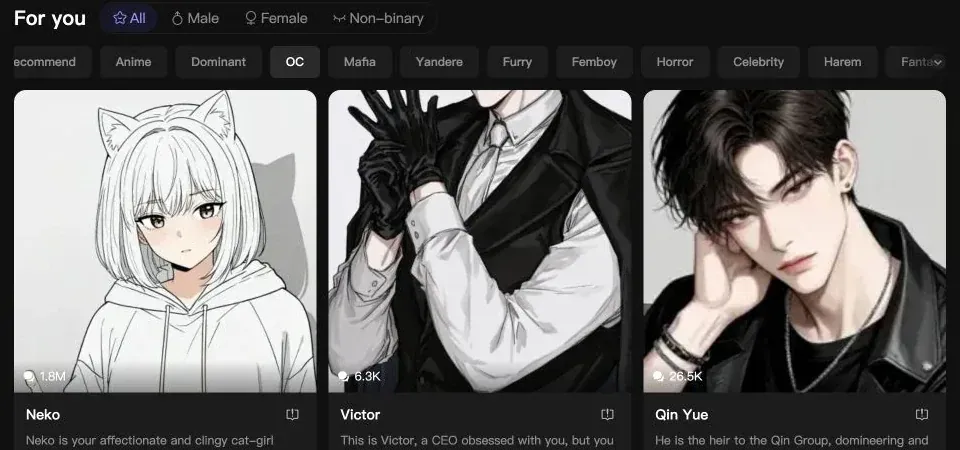
PolyBuzz's Discover page lets you browse by interests and character types. Each card gives you a short premise, so you can choose between a familiar character, an original persona, or a scenario you want to try. Opening a card takes you into that character's chat. PolyBuzz Discover
Create, Import, and Give a Character a Voice
You can customize a character's appearance, backstory, greeting, dialogue style, and voice. Set the character to public if you want others to find it, or keep it private. PolyBuzz also documents importing character cards and JSON files through its web creator. Voice has its own creation controls, including a voice library. PolyBuzz character creation guide · PolyBuzz FAQ
Use Coins and Membership Features
The Android app includes ads and in-app purchases. PolyBuzz's FAQ lists longer voice sessions, suggested replies, and response regeneration among the ways to spend Coins. It also describes membership benefits such as ad-free use and access to additional chat models. PolyBuzz FAQ · PolyBuzz on Google Play
What You Can Control in a Cycle AI Scene
When a conversation reaches a turning point, there are a few different things you might want from the next reply. You might want the character to answer a question, or the Narrator to bring a new clue into the room. Cycle AI's Responder menu lets you choose. Your Persona holds the name and background of the person you play, so you can use the same identity in other chats.
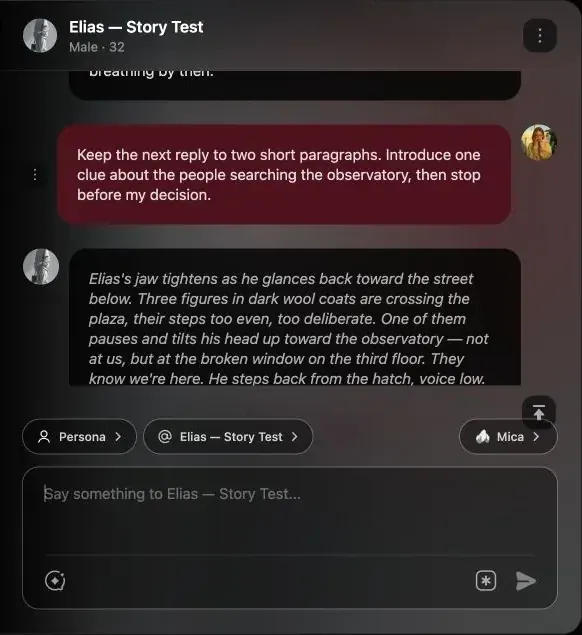
If you're creating a character, give them one clear motive and use the Prologue to put it under pressure. A Lorebook gives recurring details a place of their own. For example, who controls a city gate belongs in the Lorebook, while a guard refusing to open it belongs in the scene. When a reply advances past a choice you wanted to make, you can edit that reply or regenerate the turn. Cycle AI roleplay examples · Character creation guide
Which One Fits Your Roleplay?
Choose Cycle AI for scene direction. It suits stories where you want to keep your own role, decide when the world changes around the characters, and revise a specific turn. The public character catalog gives you an opening scene to try before creating one of your own.
Choose PolyBuzz for discovery and voice. It suits sessions where you want to browse community characters, try different greetings or premises, and use character voice as part of the experience.
FAQs About PolyBuzz and Cycle AI
Is PolyBuzz free to use?
PolyBuzz offers free character chat. Its Android app lists ads and in-app purchases, and its FAQ describes subscriptions and Coins for extra features.
What is a good PolyBuzz alternative for writing an ongoing story?
Cycle AI is a good fit if you want separate controls for the role you play, who responds next, and which world details carry across scenes. You can start with a public character or write your own Prologue.
Can I use my PolyBuzz character in Cycle AI?
You can recreate a character from the settings you have permission to use. Bring over the background, speaking style, and relationships, then write a Prologue that resumes the story at the point you want to play.
Find Your Next Roleplay Character
Choose a character, read the opening scene, and decide how you'll respond.
Browse Cycle AI Characters